
Corsair K100 AIR Review
The Corsair K100 AIR is a sophisticated keyboard tailored for gamers and enthusiasts who demand both performance and aesthetics in a sleek form factor. With its ultra-thin design and advanced Cherry MX Ultra Low Profile switches, this keyboard aims to deliver an exceptional typing and gaming experience while seamlessly fitting into modern setups. If you’re looking for a high-quality, feature-rich mechanical keyboard that doesn’t compromise on style, the K100 AIR is worth considering.
- Switch Type: Cherry MX Ultra Low Profile
- Connectivity: Tri-Mode (USB, Bluetooth, Slipstream)
- Dimensions: 437 x 156 x 22 mm
- Weight: 0.95 kg
- Key Feature: Ultra-thin Design
| Key Specifications | |
|---|---|
| Switch Type | Cherry MX Ultra Low Profile |
| Connectivity | Tri-Mode (USB, Bluetooth, Slipstream) |
| Dimensions | 437 x 156 x 22 mm |
| Weight | 0.95 kg |
| Key Feature | Ultra-thin Design |
In This Review
Overview & Key Features
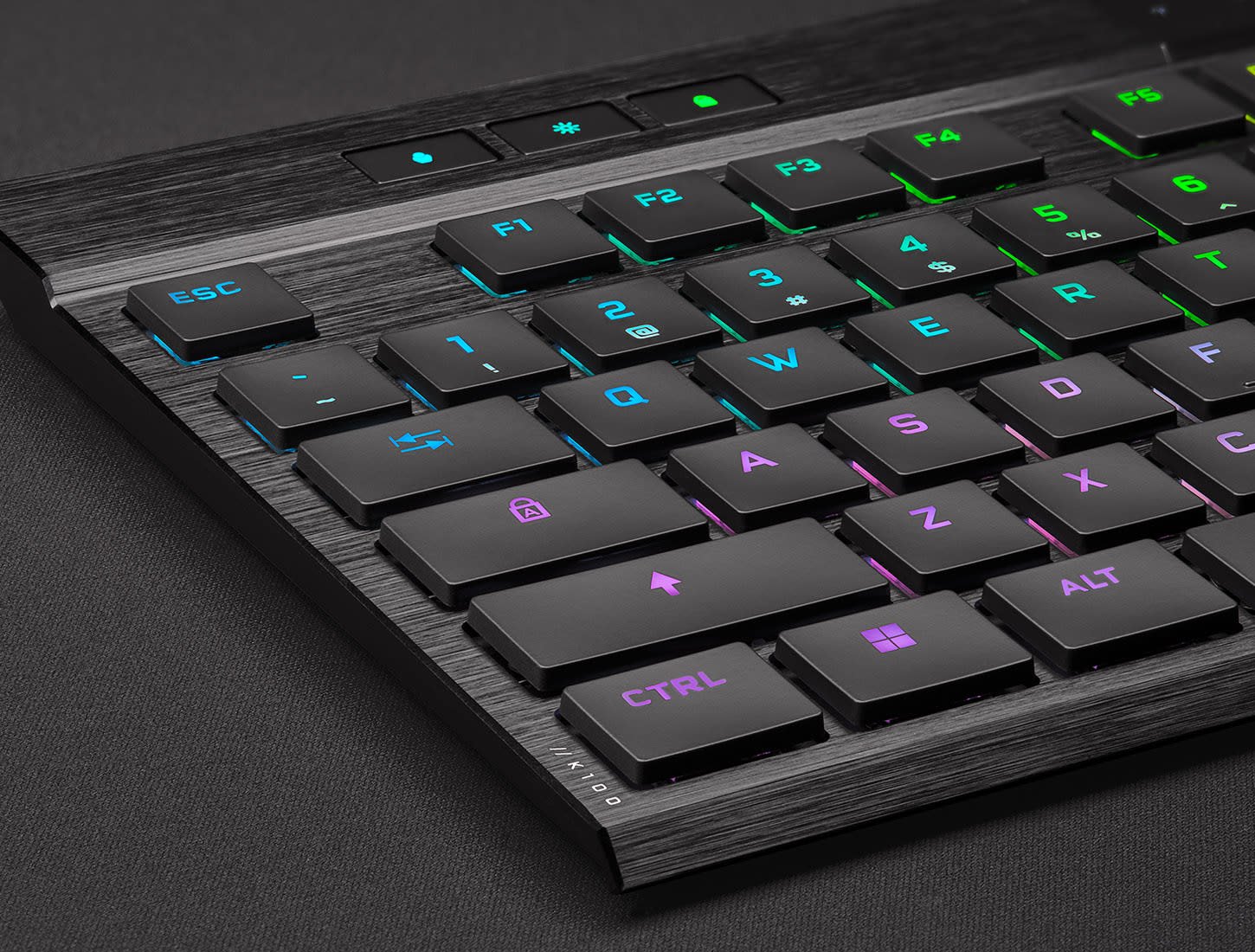
The Corsair K100 AIR stands out with its ultra-slim profile, measuring only 22mm in height, which makes it one of the thinnest mechanical keyboards available. It features Cherry MX Ultra Low Profile switches, providing a tactile feel similar to traditional mechanical keyboards while offering a quieter typing experience. The keyboard supports tri-mode connectivity, allowing users to switch between USB wired, Bluetooth, and Corsair’s Slipstream wireless technology with ease. Additionally, its customizable RGB lighting and dedicated media controls enhance the overall user experience.
Overall, the K100 AIR is designed for gamers and professionals who seek a combination of performance, style, and functionality.
Performance & User Experience
The performance of the Corsair K100 AIR is impressive, especially for gamers who appreciate responsiveness. The Cherry MX Ultra Low Profile switches provide a satisfying tactile feedback with a travel distance of just 3.2mm, allowing for quick key presses without the loud click often associated with traditional mechanical switches. This makes it suitable for both fast-paced gaming scenarios like competitive shooters and lengthy typing sessions, where comfort and speed are paramount.
In terms of latency, the keyboard performs exceptionally well, with polling rates of up to 8,000 Hz when wired, ensuring that every keystroke registers instantaneously. When used wirelessly, the Slipstream technology maintains a low-latency connection, making it virtually indistinguishable from wired performance. However, gaming enthusiasts should note that the K100 AIR lacks a detachable cable, which could be a consideration for portability.
Key rollover is another critical aspect, and the K100 AIR supports full N-key rollover, meaning multiple key presses can be registered simultaneously without conflict. This feature is particularly advantageous in gaming scenarios where multiple commands are executed at once.
Additionally, the keycap quality, made from laser-etched ABS plastic, provides durability while maintaining a sleek appearance. However, users have reported that the keycaps can show fingerprints and oil marks quickly, which may require frequent cleaning.
Overall, the K100 AIR excels in both typing and gaming performance, making it a solid choice for users who engage in both activities regularly.
Comparison
When compared to competitors in the market, such as the Logitech MX Mechanical and the Razer DeathStalker V2 Pro, the Corsair K100 AIR holds its own regarding features and performance. While the Logitech MX Mechanical offers a similar low-profile design, it lacks the dedicated gaming features and tri-mode connectivity that the K100 AIR boasts. On the other hand, the Razer DeathStalker V2 Pro provides customizable RGB and a robust build quality but may not offer the same level of tactile feedback as the Cherry MX switches.
Users seeking a compact option might consider the NuPhy Air75, which, while smaller and more affordable, compromises on some features and build quality compared to the K100 AIR.
Overall, the K100 AIR distinguishes itself with its ultra-thin aesthetic, tri-mode connectivity, and high-performance switches, making it an excellent choice for serious gamers and typists alike.
Looking for more options? Check out our best gaming keyboards.
Pros & Cons
- Incredibly thin design
- Excellent typing feel
- Tri-mode connectivity
- Customizable RGB
- Durable keycaps
- High price point
- Keycaps show fingerprints
- Flat profile may cause typos
- No detachable cable
FAQ
Is the Corsair K100 AIR good for gaming?
Yes, the K100 AIR features low latency and responsive keys, making it excellent for gaming.
Can I use the K100 AIR wirelessly?
Yes, it supports USB, Bluetooth, and Slipstream wireless connectivity.
What switch type does the K100 AIR use?
It uses Cherry MX Ultra Low Profile switches for a tactile typing experience.
Does the K100 AIR have customizable RGB lighting?
Yes, you can customize the RGB lighting through Corsair's iCUE software.
Final Verdict
The Corsair K100 AIR is a premium wireless mechanical keyboard that excels in both design and performance. It's ideal for gamers and typists who value responsiveness and aesthetics but comes at a higher price point. If you're looking for a sleek and feature-rich keyboard, the K100 AIR is a worthy investment.