
Logitech G502 X review
The Logitech G502 X is the latest iteration of Logitech’s iconic G502 gaming mouse series. Designed for gamers who demand precision and performance, it combines a comfortable ergonomic design with advanced features that appeal to both casual and competitive players. In this review, we’ll explore the G502 X’s specifications, performance, and how it stacks up against its predecessors and competitors.
- DPI: 25,600
- Weight: 89g
- Button Count: 9
- Sensor: Hero 25K
- Key Feature: Ergonomic Design
| Key Specifications | |
|---|---|
| DPI | 25,600 |
| Weight | 89g |
| Button Count | 9 |
| Sensor | Hero 25K |
| Dimensions | 5.2 x 1.6 x 3.1 inches |
In This Review
Overview & Key Features
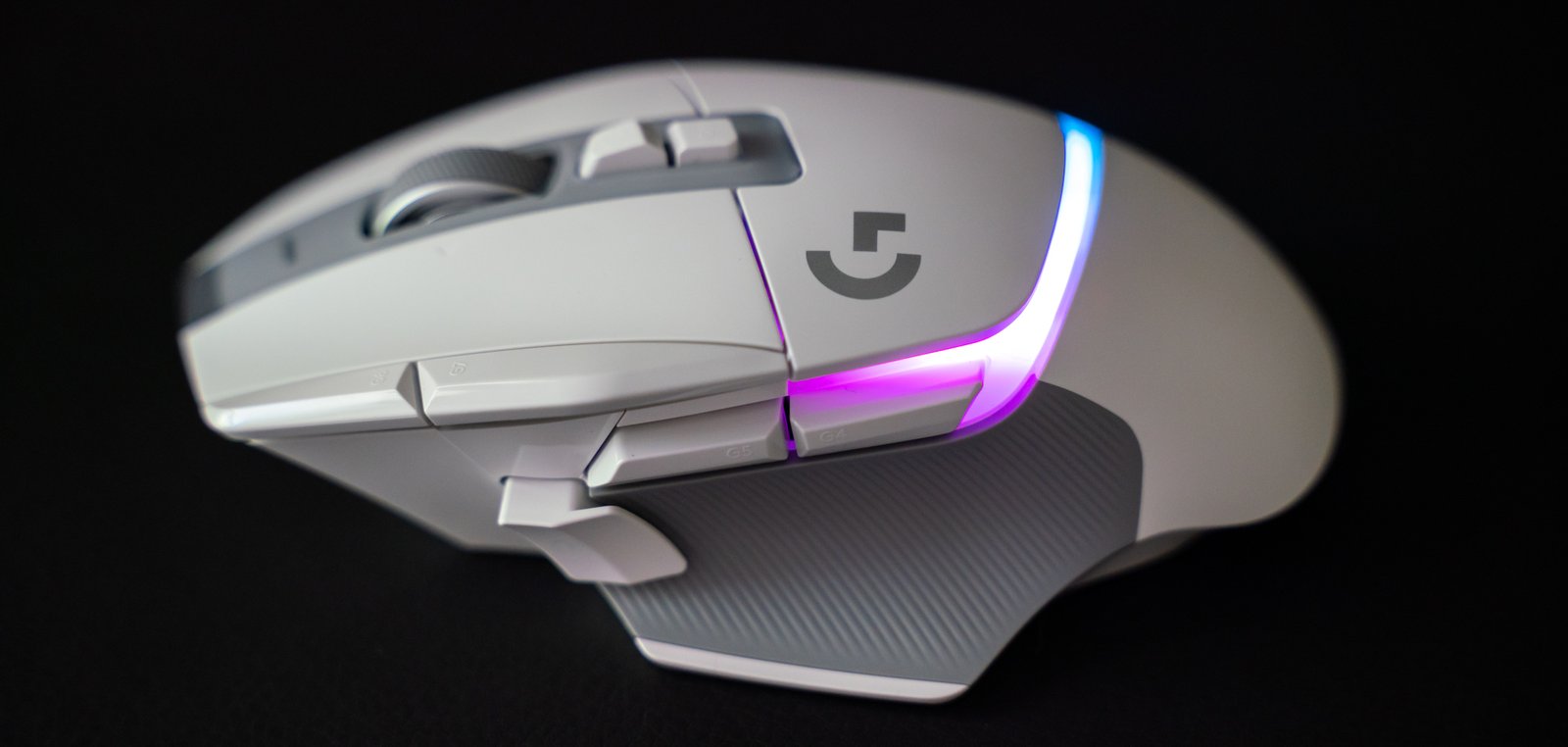
The Logitech G502 X retains the beloved ergonomic shape of its predecessors while introducing some notable enhancements. The most significant change is the reduction in weight, now at just 89 grams, making it one of the lighter gaming mice in its class. This weight reduction enhances maneuverability, especially for fast-paced gaming genres like first-person shooters. The G502 X features the Hero 25K sensor, which offers exceptional sensitivity and precision, catering to those who require finely-tuned control in their gaming experience.
The mouse boasts nine customizable buttons, providing gamers with ample options for gameplay configurations. The light sync technology allows for seamless integration with other Logitech peripherals, although it lacks extensive RGB lighting options, which some users might miss. The ergonomic design ensures comfort during extended gaming sessions, with a rubberized thumb rest for improved grip and control.
Performance & User Experience
In terms of performance, the G502 X shines with its impressive DPI capabilities, reaching up to 25,600. This high sensitivity is perfect for competitive gaming, allowing for quick adjustments on-the-fly during intense matches. The button layout is meticulously designed, ensuring that each button is easily accessible without requiring extensive finger movement.
Users have noted that the G502 X feels solid in hand, with a satisfying tactile response when buttons are pressed. However, some reviewers have mentioned that the new Lightforce switches, while innovative, may produce a clunky sound, which could be distracting in quieter environments. The mouse performs well across various gaming genres, from FPS titles to real-time strategy games, thanks to its versatility and adaptability.
The G502 X’s software, Logitech G HUB, allows for extensive customization of button functions and lighting effects, making it easier for users to create personalized setups tailored to their gaming style. The overall user experience is enhanced by the mouse’s comfortable grip and lightweight design, making it an excellent choice for long gaming sessions.
Comparison
When comparing the G502 X to its predecessor, the G502 Hero, the most noticeable difference is the weight reduction and minor ergonomic enhancements. The Hero weighed 121 grams, which some users found to be slightly cumbersome, particularly during fast-paced gaming. The G502 X, with its lighter chassis, appeals to gamers looking for agility without sacrificing performance.
Competing models, such as the Razer DeathAdder V3 and Corsair Scimitar, also offer high DPI sensors and customizable buttons, but they tend to be heavier or have different ergonomic designs. The G502 X stands out with its unique button placement and customizable options, making it a versatile choice for various gaming styles.
Looking for more options? Check out our best gaming mouse.
Pros & Cons
- Lightweight design
- Excellent ergonomic shape
- Highly customizable
- Impressive DPI sensitivity
- Clunky button switches
- Limited RGB lighting
- No weight customization options
FAQ
Is the Logitech G502 X suitable for all gaming genres?
Yes, the G502 X is designed to perform well across various genres including FPS, RPG, and strategy games.
How does the G502 X compare to its predecessors?
The G502 X is lighter and has minor ergonomic improvements, retaining much of the original design and features.
Can I customize the buttons on the G502 X?
Yes, the G502 X offers extensive customization options through the Logitech G HUB software.
Does the G502 X have RGB lighting?
The G502 X has limited RGB lighting, primarily focused on the DPI indicator.
Final Verdict
The Logitech G502 X is an excellent choice for gamers seeking a lightweight, ergonomic mouse with high sensitivity and customizable features. While it may not introduce groundbreaking changes compared to its predecessors, it remains a top-tier option for both casual and competitive gamers.